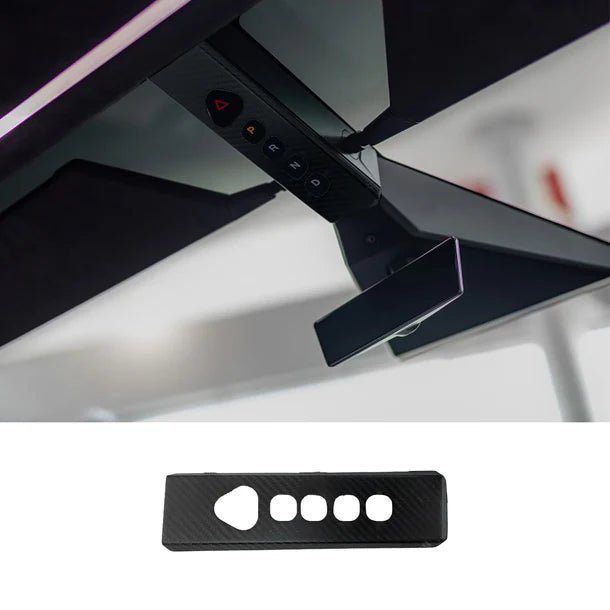
Carbon Fiber Trim Around Cybertruck Overhead Controls
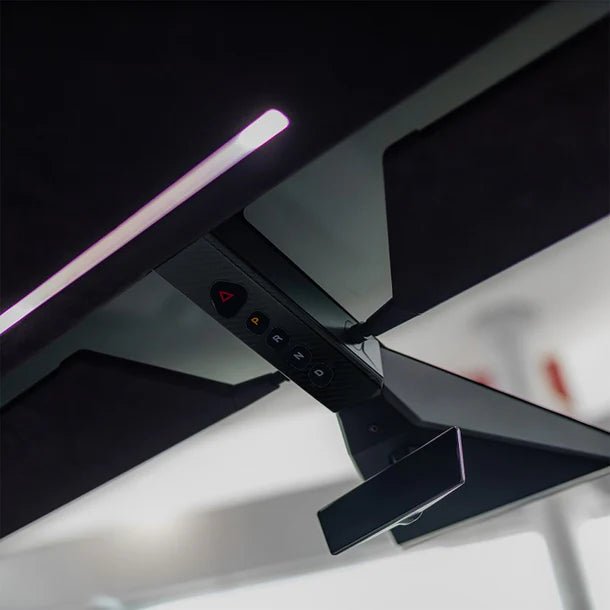
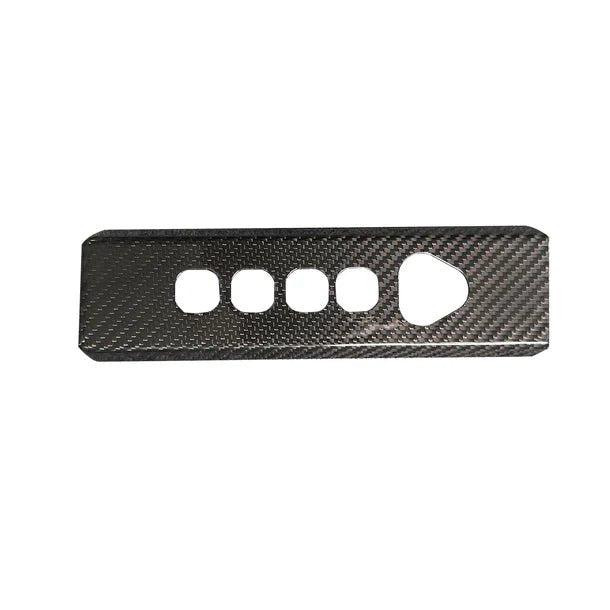
Add matte or glossy carbon-fiber trim around the original overhead P, R, N, D and hazard controls on Cybertruck. The narrow adhesive frame has five openings to leave the original control faces exposed. The frame leaves the separate dome-light, cabin-radar and camera areas clear.
- Open control frame
- Matte or glossy
- Adhesive trim
Hauptmerkmale
-
Overhead Control Trim
A narrow decorative frame fits around the original Cybertruck overhead drive-mode and hazard-control area.
-
Five Openings
Cut-outs surround the hazard button and P, R, N and D controls; align them so the complete original contact faces and indicators remain open.
-
Carbon Fiber Finish
The carbon-fiber trim is available with a matte or glossy surface finish.
-
Adhesive Attachment
The frame attaches to its matching surrounding trim surface without replacing the original controls or adding electronics.
-
Profile
The outside edge and openings follow the original console.
-
Clear Surrounding Equipment
Keep the lower camera opening and the separate front dome-light and cabin-radar area clear of the trim and adhesive.
Highlights
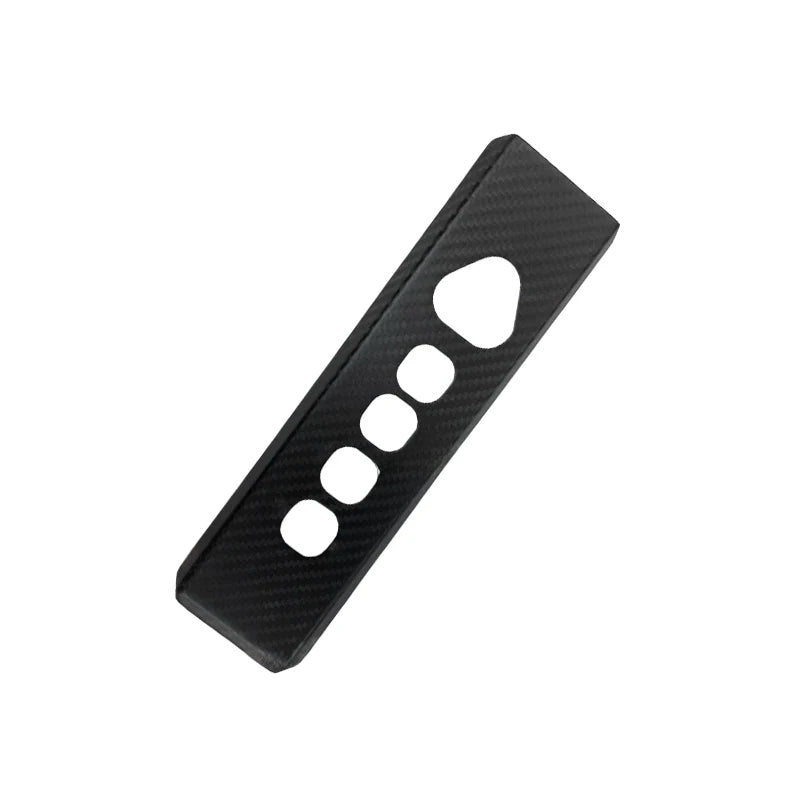
Five Openings for the Original Controls
The frame surrounds the hazard control and four drive-mode controls. Align every opening with the full original button face, label and indicator before exposing adhesive. The openings should provide clear access without overlapping a contact surface or leaving adhesive at its edge.
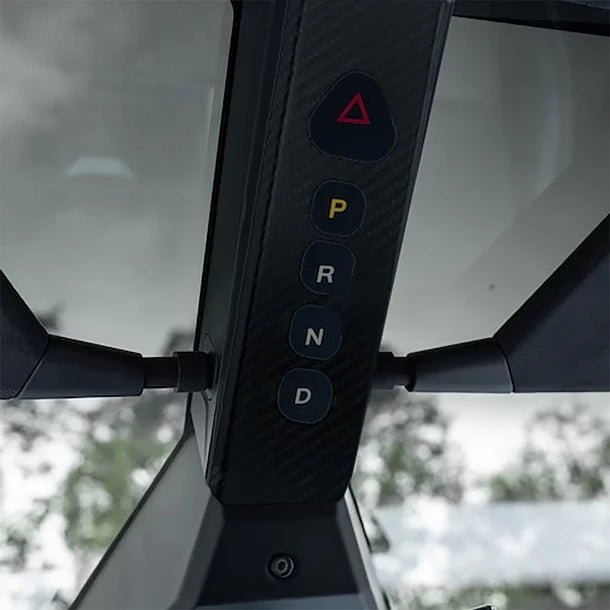
Trim for the Surrounding Console Surface
The narrow frame adds a carbon-fiber finish to the original surrounding trim. It does not replace the selector, add lighting or connect to vehicle wiring. Its outer edge must stay within the matching control-strip profile, clear of the camera and the separate dome-light/radar area.
Select Matte or Glossy
Matte Carbon Fiber and Glossy Carbon Fiber are separate finish options. Available in matte or glossy, with the same five-opening outline. Please Select is a selection prompt rather than a separate finish.
Kompatibilität
| Modell | Years / Version | Hinweise |
|---|---|---|
| Cybertruck | 2024+ | Original overhead hazard/P/R/N/D control surround; actual full frame profile and openings to match. |
Fit the frame only within its matching surrounding surface; keep the entire control faces and LEDs, the lower camera opening and the separate dome-light/radar area above the strip open.
Technische Daten
| Produkttyp | Open-frame overhead control-area decorative trim cover |
|---|---|
| Compatible Models | Cybertruck 2024+; actual overhead control outline and openings must match |
| Position / Location | Around the overhead P/R/N/D and hazard controls, separate from the reading-light lens |
| Material | Carbon fiber |
| Surface Finish | Matte or Glossy, selected separately |
| Menge | 1 trim frame |
| Installation Type | Adhesive attachment to the matching surrounding trim surface |
| Versandgewicht | 250 g (0.55 lb) |
Installation
- Park the vehicle and position the frame with the adhesive backing still covered. Stop if an opening or outer edge overlaps a control, camera or separate light/radar area.
- Clean only the intended surrounding trim using products compatible with the original surface and the adhesive. Keep moisture and cleaner out of controls, lights and sensor openings.
- Align the frame and apply it following the adhesive instructions, pressing only its surrounding trim areas without touching or activating the controls. Do not stretch, trim or add adhesive across openings.
- Follow the actual adhesive cure guidance.
Gut zu wissen
Achtung
- Leave the full hazard and P/R/N/D contact faces, labels and LEDs exposed; do not allow adhesive to enter or bridge their edges.
- The overhead selector is an original vehicle control used when required by the vehicle instructions. This trim does not replace it, improve its function or remove its normal operating conditions.
- The frame stays clear of the front dome-light/cabin-radar area above the control strip and the camera opening below it.
- Fit while parked and avoid pressing controls during application. If the trim interferes or produces unintended input, restore original operation before using the vehicle.
Pflege
- Wipe the trim gently with a lightly damp cloth, keeping liquid away from the original controls and surrounding equipment.
- Adhesive removal can affect the original finish.
FAQ
Is this a cover over the reading-light lens?
The pictured narrow frame fits around the overhead hazard and P/R/N/D control strip. It leaves those five original control faces open and does not replace the reading-light lens or any electronics.
Which finish options are available?
Choose Matte Carbon Fiber or Glossy Carbon Fiber. Please Select is the option prompt and does not identify an additional finish.
Does it change how the overhead selector works?
The original vehicle controls and their operating conditions remain. The frame does not overlap control faces.
Where must the frame and adhesive remain clear?
Keep all five original control faces and LEDs open, along with the camera below the strip and the separate front dome-light/cabin-radar area above it. Stop fitting if the supplied outline extends into any of those areas.


 English
  German
  Spanish